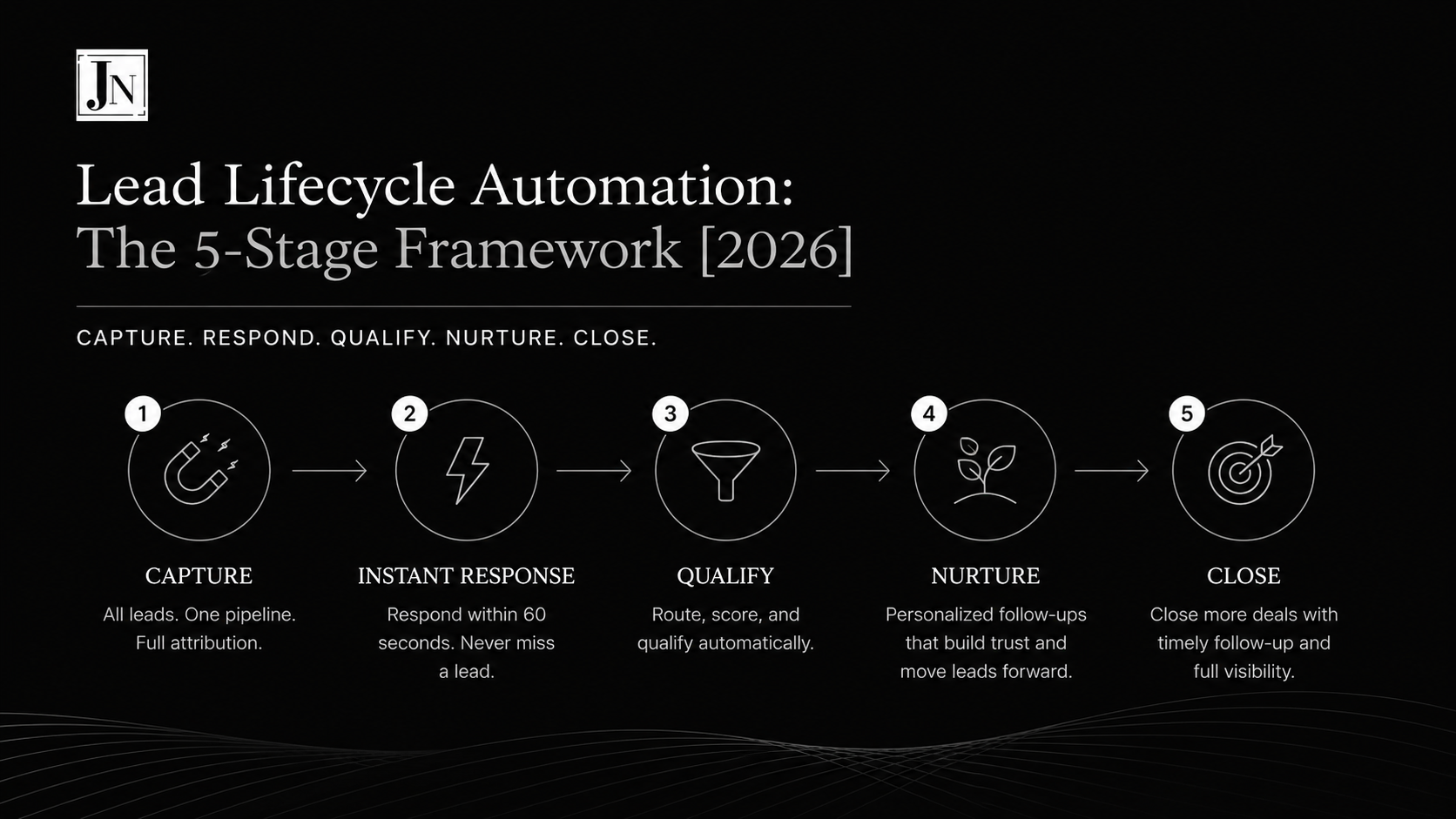
TL;DR: Lead lifecycle automation is a system that handles every lead from capture to close automatically — instant response within 60 seconds, automatic routing to sales, a qualification gate that splits leads into follow-up tasks or nurture sequences, and measurement at every stage. Teams that respond to leads within 5 minutes are up to 21x more likely to qualify them than teams that wait 30 minutes (source: Lead Response Management Study, InsideSales/XANT). Most teams can implement this framework in two weeks, starting with instant response.

What is lead lifecycle automation?
Lead lifecycle automation is a RevOps practice of using automated workflows to manage every stage a lead passes through — capture, first response, routing, qualification, and follow-up — so that no step depends on a person remembering to act. Humans make the judgment calls; automation executes everything routine.
Most businesses don’t have a lead generation problem. They have a lead handling problem. Leads come in, sit in an inbox, get followed up “when someone has time,” and quietly die. The Lead Lifecycle Automation Flow is the framework I use to make sure that never happens.
The five stages of the Lead Lifecycle Automation Flow
Stage 1: Capture — one pipeline, full attribution
Every entry point — forms, ads, chat widgets, booked calls — feeds a single CRM pipeline. No side doors. The moment a lead exists, it exists in the CRM with source, campaign, and UTM data attached. A lead without attribution data is a lead you can’t learn from: if you can’t trace where it came from, you can’t decide where next month’s budget goes.
Stage 2: Instant response — the 5-minute window
Speed-to-lead is the highest-leverage variable in the funnel. The flow fires a welcome email or SMS within the first 60 seconds, while buying intent is at its peak. Research from the Lead Response Management Study found that contacting a lead within 5 minutes makes you up to 21x more likely to qualify them compared to waiting 30 minutes — yet the average B2B response time is measured in hours, not minutes. Automating this single step routinely outperforms entire ad-spend increases.
Stage 3: Route and notify — context attached, ownership assigned
In parallel with the response, the lead is added to the CRM pipeline and the sales team is notified where they actually work — Slack, Teams, or inside the CRM. The notification carries everything needed to act: name, source, what the lead requested, and a one-click link to the record. No digging. No “who’s got this one?”
Stage 4: Qualify — the decision gate
A qualification gate — fit criteria, budget signals, behavior scoring, or a discovery question — splits the flow into two paths:
Qualified leads get a follow-up task created and assigned with a due date. The task owns the follow-up, not the rep’s memory.
Not-yet leads enter a nurture sequence — a deliberate cadence of value-driven touches that keeps the door open until timing improves. Nurture is not a graveyard: a meaningful share of closed revenue comes from leads who said “not now” a quarter earlier.
Stage 5: Measure — close the loop
Every stage writes data back: response times, conversion rates per source, drop-off points, nurture re-entry rates. The reporting layer answers the only questions that matter: where do leads come from, where do they stall, and what does each channel actually return?
Why lead lifecycle automation works
The framework removes the three places leads die:
- Slow first response — solved by automated instant outreach
- Unclear ownership — solved by automatic routing and assignment
- Forgotten follow-up — solved by task creation and nurture sequences
It also compounds: every lead that runs through the system sharpens the reporting, which improves the next campaign decision.
What tools do you need for lead lifecycle automation?
The framework is tool-agnostic — the stages matter, the software is interchangeable. A typical implementation stack:
- CRM layer: GoHighLevel or HubSpot
- Automation logic: n8n or native CRM workflows
- Task layer: ClickUp
- Reporting: Looker Studio
How long does it take to implement?
Most teams have a working lead lifecycle inside two weeks. Don’t build all five stages at once: start with instant response — it’s the smallest build with the fastest measurable win — then add routing, then the qualification gate.
Frequently asked questions
What is speed to lead? Speed to lead is the time between a lead’s first contact (form fill, call booking, ad click-through) and your first response. It is the single strongest predictor of lead qualification rates — responding within 5 minutes dramatically outperforms responding within hours.
Does lead lifecycle automation replace salespeople? No. It removes the routine work — first responses, data entry, routing, reminders — so salespeople spend their time on judgment calls and conversations. Automation executes the process; humans close the deals.
What’s the difference between lead lifecycle automation and a drip campaign? A drip campaign is one component (the nurture stage). Lead lifecycle automation covers the entire journey: capture, instant response, routing, qualification, nurture, and measurement — with logic that moves leads between stages based on behavior.
Can small teams use this framework? Yes — small teams benefit most, because automation substitutes for headcount. A two-person team with this flow responds faster and follows up more consistently than a ten-person team running on memory and spreadsheets.
Want this implemented in your stack? Book a strategy call and I’ll map your current lead flow against this framework — you’ll see exactly where leads are leaking before we change anything.